
Learn about subscription states and transitions, so you can provision access, handle failures, and know when billing ends.
Every subscription moves through a predictable set of states from creation to completion. Understanding the transitions between them is essential for knowing when to provision access to your product or service, when to send customer communications, and when to handle failures. Each state is described where it matters - in the transition that leads to it.
Many plans also include a free trial - a trial changes how the subscription is activated, see Subscription trials.
For a quick reference, see the states table in Subscription plans. For the canonical list, see the state parameter in Retrieve a subscription.
Subscription state flow
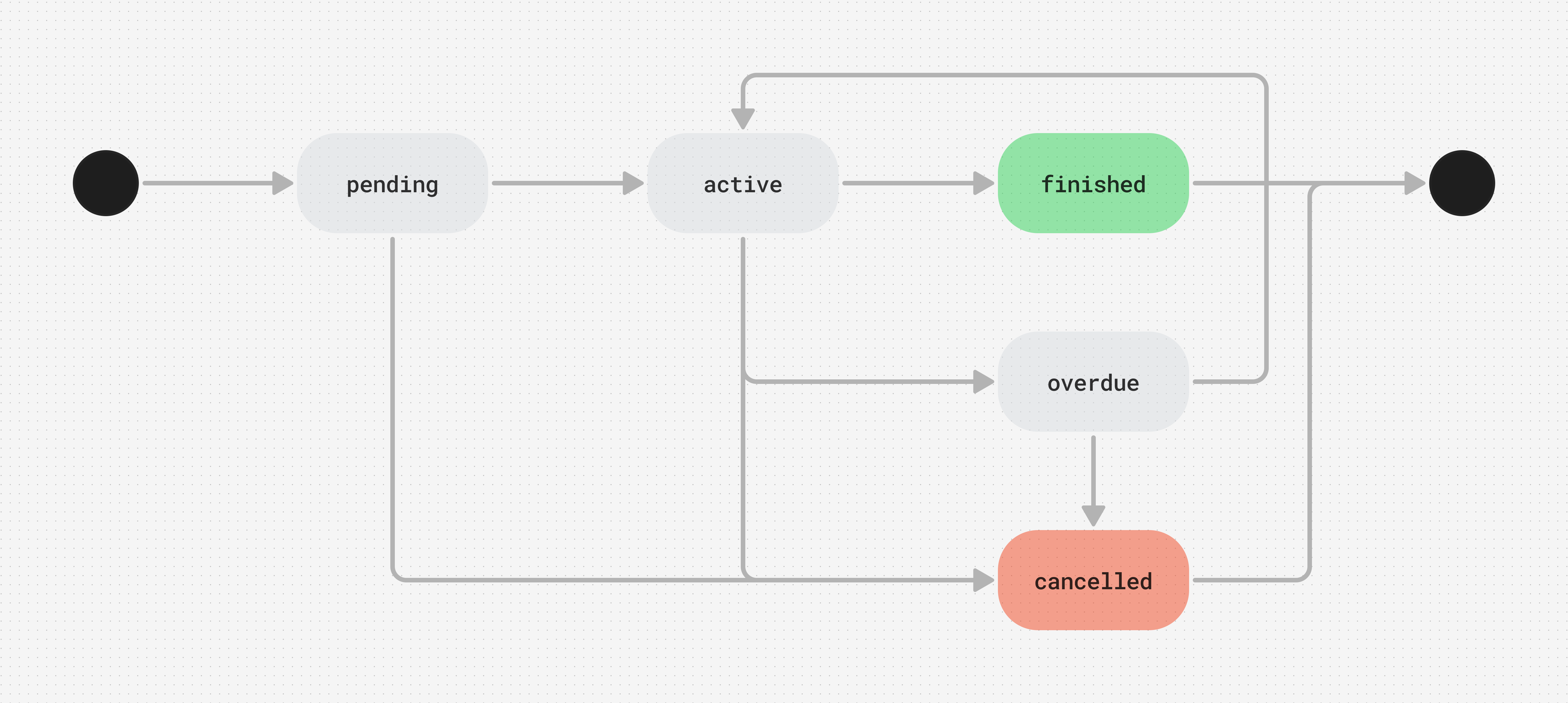
The table below describes each transition between states - each row corresponds to an arrow in the diagram:
| Initial state | Result state | Description |
|---|---|---|
| - | pending | Subscription is created at sign-up, including trial plans - it stays pending until activation (see Subscription trials for how trials activate). |
pending | active | Customer completes the first payment, or - for a trial plan - provides a payment method. Revolut saves the payment method and collects all subsequent charges automatically - the customer doesn't need to be present for renewal payments. |
pending | cancelled | Customer doesn't complete the first payment, or - for a trial plan - provide a payment method, within the set time period - the subscription is cancelled without ever going live. |
active | active | Renewal payment succeeds at the end of a billing cycle - the subscription continues to the next cycle. |
active | overdue | Renewal payment for the current billing cycle fails. Revolut is retrying or awaiting a new payment method from the customer. |
active | cancelled | Merchant or customer cancels the subscription. |
active | finished | All billing cycles of a fixed-cycle plan are completed successfully. |
overdue | active | Retry succeeds, or the customer updates their payment method and makes a successful payment. |
overdue | cancelled | Retries are exhausted or disabled - the subscription is cancelled at the end of the current billing cycle. |
cancelled and finished are final states - a subscription in either state cannot be reactivated. To resume billing, create a new subscription for the customer.
Monitor these transitions in your integration with subscription state-change webhook events - see Webhooks for subscriptions.
Failed payments and retries
Retries are enabled by default. If you disable them, a failed payment moves the subscription to overdue and it is cancelled at the end of the current billing cycle - unless the customer updates their payment method and the payment succeeds before then.
The same applies when all retry attempts are exhausted: the subscription is cancelled at the end of the current billing cycle - not immediately. This gives the customer a final window to update their payment method before the subscription ends.
Encourage customers to update their payment method as soon as a payment fails. A successful payment after updating the payment method moves the subscription back to active.
Subscription trials
Plans can include a trial phase - a free period before the first payment is collected. A trial changes how the subscription is activated.
What is a subscription trial
A free trial gives customers access to your product for a limited time before the first payment is collected. A subscription with a trial starts in pending and moves to active the moment the customer provides a payment method - the trial then begins, and the first payment is collected when the trial ends.
Revolut requires a valid payment method at sign-up - customers cannot start a trial without providing payment details.
How it works
A trial subscription behaves as follows:
| Behaviour | Description |
|---|---|
| Subscription state before the trial starts | pending - created at sign-up, activates when the customer provides a payment method |
| Subscription state during trial | active - active from the moment the trial starts, once the payment method is provided |
| First charge | Collected automatically when the trial ends - no customer action needed |
| Customer cancels during trial | Subscription moves to cancelled. No charge is made. |
| Trial with promotional phase | If the plan includes both a trial and a promotional phase, the trial runs first, then the promotional pricing applies, then the standard price |
Send a reminder email a few days before the trial ends so customers know their first payment is coming. This reduces surprise charges and chargeback risk.
Customer signs up and provides a payment method
The subscription starts in pending. When the customer provides a payment method, it moves to active and the trial begins. The customer has full access to the product, and no charges are made during the trial.
Trial ends
Revolut collects the first payment automatically. No customer action is needed.
First payment succeeds
The subscription stays active and regular billing begins on the plan's schedule.
First payment fails
The subscription moves to overdue and follows the same retry flow as any failed renewal payment: a successful retry or an updated payment method moves it back to active; when all retries are exhausted, it is cancelled at the end of the current billing cycle.
Payment status vs subscription status
A subscription's state and the status of individual payments are related but distinct. A subscription can be active even if a previous cycle's payment failed and was later resolved.
| Payment outcome | Subscription state | What it means |
|---|---|---|
| First payment succeeds | pending → active | Subscription is now live and will bill automatically |
| Renewal payment succeeds | Stays active | Normal renewal cycle |
| Renewal payment fails | active → overdue | Payment for the current billing cycle has failed |
| Retry succeeds | overdue → active | Subscription resumes normal billing |
| All retries fail | overdue → cancelled | Subscription ends at end of current billing cycle |
| Trial ends, first payment succeeds | Stays active | Trial is over, billing begins |
| Trial ends, first payment fails | active → overdue | Payment for the first charge has failed |