# Accept payments via Revolut Pay - React Native
The **Revolut Pay SDK for React Native** lets merchants add the Revolut Pay button to their cross-platform apps. This guide walks you through integrating **Revolut Pay Lite** allowing customers to pay via the Revolut app or a secure in-app WebView.
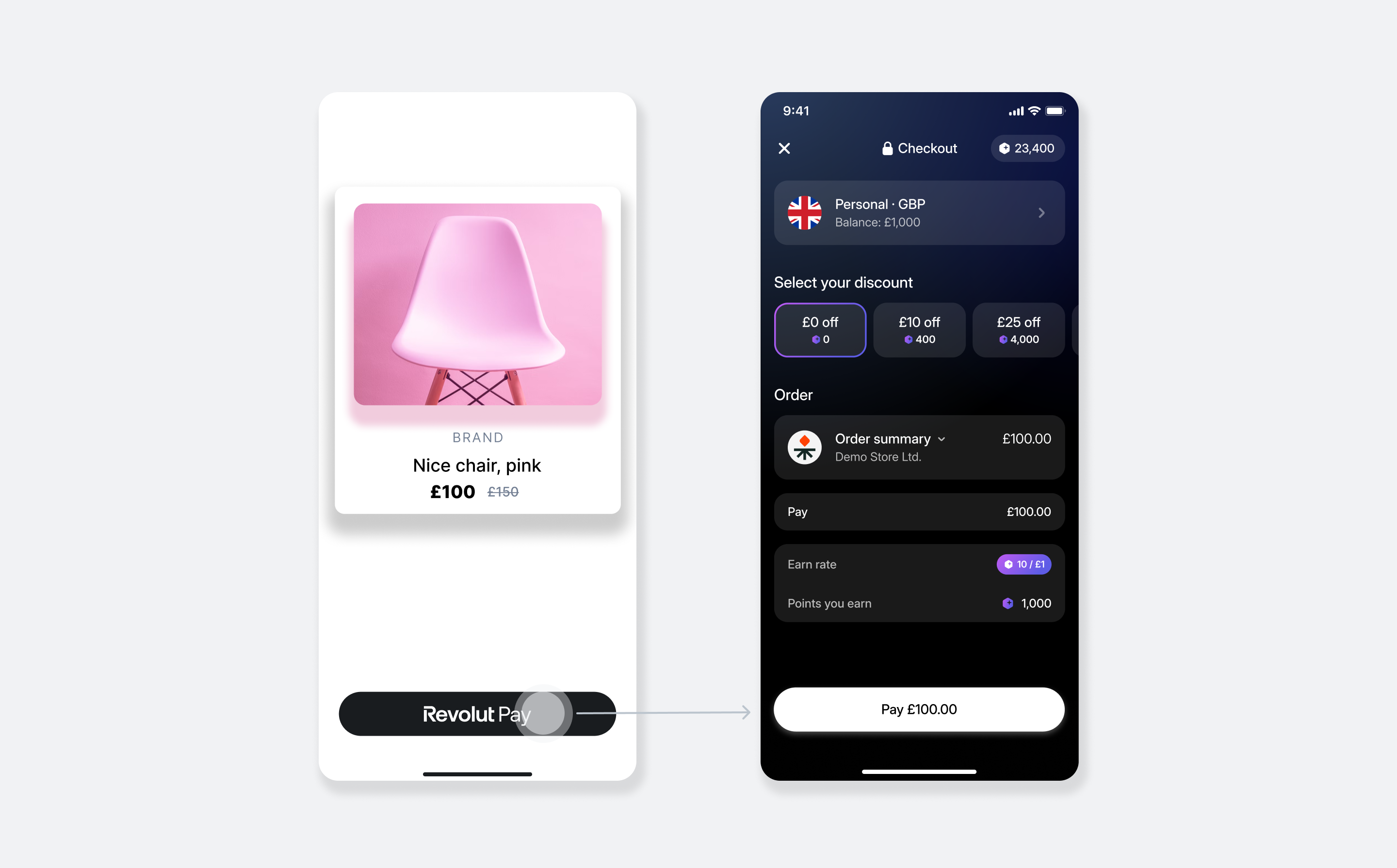
## How it works
From an implementation perspective, the SDK works with the following components:
1. **Server-side:** A server-side endpoint is required to securely communicate with the Merchant API to [create orders](/docs/api/merchant#create-order).
1. **Client-side:** The SDK is configured in your app with your public API key. When the customer taps the Revolut Pay button, the `onCreateOrder` callback calls your server to fetch an order `token`, which the SDK uses to initiate the payment.
1. **Endpoint for webhooks:** Your server should listen for webhook events to reliably track the payment lifecycle. For more information, see: [Use webhooks to keep track of the payment lifecycle](/docs/guides/merchant/monitor-and-observe/webhooks/using-webhooks).
:::note
Only **Revolut Pay Lite** is available for React Native. Revolut Pay Native - which renders the entire payment experience inside your app - is not supported. If you need Revolut Pay Native, see the [iOS guide](/docs/guides/merchant/accept-payments/online-payments/revolut-pay/mobile/ios) or [Android guide](/docs/guides/merchant/accept-payments/online-payments/revolut-pay/mobile/android).
:::
The payment flow:
1. The customer taps the **Revolut Pay** button.
1. Your app calls `onCreateOrder`, which fetches an order `token` from your server.
1. The SDK checks for the Revolut app:
- **If installed:** The customer is redirected to the Revolut app to authorise the payment, then redirected to your app via deep link.
- **If not installed:** The SDK opens a secure in-app WebView for the customer to complete the payment.
1. The SDK fires the `onCompletion` callback with the payment result.
1. Your server receives webhook notifications to confirm the payment's final state and securely fulfil the order.
### Implementation overview
1. [Set up an endpoint for creating orders](#1-set-up-an-endpoint-for-creating-orders)
1. [Configure deep link](#2-configure-deep-link)
1. [Install the SDK](#3-install-the-sdk)
1. [Initialise the SDK](#4-initialise-the-sdk)
1. [Add the Revolut Pay button](#5-add-the-revolut-pay-button)
1. [Handle the payment result](#6-handle-the-payment-result)
1. [Set up webhooks](#7-set-up-webhooks)
### Before you begin
Before you start your integration, ensure you have:
- [ ] [Active Revolut Business account with Merchant capabilities](/docs/guides/merchant/get-started)
- [ ] [API credentials for the Merchant API](/docs/guides/merchant/get-started)
- [ ] A React Native project set up and ready for development
## Implement Revolut Pay on React Native
### 1. Set up an endpoint for creating orders
To display the Revolut Pay button in your app, your client-side code needs to fetch a unique, single-use `token` that represents an order. This `token` can only be created on your server by making a secure call to the Revolut Merchant API.
**This** server-side endpoint is a mandatory **security requirement**. Your secret API key must never be exposed in your React Native application.
When a customer taps the Revolut Pay button in your app, the SDK calls your `onCreateOrder` callback. Your endpoint is then responsible for:
1. Receiving the checkout details (e.g., `amount`, `currency`) from your client-side request.
1. Securely calling the [Merchant API: Create an order endpoint](/docs/api/merchant#create-order) with the checkout details.
1. Receiving the order object, including the public `token`, in the API response.
1. Returning the `token` from the response to your app.
Below is an example of the JSON response your endpoint will receive from the Merchant API after successfully creating an order. The crucial field to extract and return to your app is the `token`.
```json [Example response] {3}
{
"id": "6516e61c-d279-a454-a837-bc52ce55ed49",
"token": "0adc0e3c-ab44-4f33-bcc0-534ded7354ce",
"type": "payment",
"state": "pending",
"created_at": "2023-09-29T14:58:36.079398Z",
"updated_at": "2023-09-29T14:58:36.079398Z",
"amount": 1000,
"currency": "GBP",
"outstanding_amount": 1000,
"capture_mode": "automatic",
"checkout_url": "https://checkout.revolut.com/payment-link/0adc0e3c-ab44-4f33-bcc0-534ded7354ce",
"enforce_challenge": "automatic"
}
```
### 2. Configure deep link
Revolut Pay Lite redirects customers to the Revolut app to authorise payment, then back to your app via a custom URL scheme. This step registers that scheme in the native platform files of your React Native project - not in JavaScript code.
Choose a scheme and host for your app (for example, scheme `myapp` and host `revolut-pay`). You will pass the resulting URL as `returnURL` to the Revolut Pay button in [step 5](#5-add-the-revolut-pay-button).
:::note
React Native apps bundle native iOS and Android projects, so both platforms need to be configured before proceeding.
:::
- ![iOS]
Add two entries to your `Info.plist`:
- **`LSApplicationQueriesSchemes`** - allows the SDK to check whether the Revolut app is installed.
- **`CFBundleURLTypes`** - registers your custom URL scheme so iOS routes the deep link back into your app.
```xml
LSApplicationQueriesSchemes
revolut
CFBundleURLTypes
CFBundleURLSchemes
myapp
```
After installing the SDK in [step 3](#3-install-the-sdk), you will add the URL handler to `AppDelegate.swift` in [step 4](#4-initialise-the-sdk).
- ![Android]
In your `AndroidManifest.xml`, add a `` element to allow the SDK to check whether the Revolut app is installed, and an `` to register your deep link scheme:
```xml
```
After installing the SDK in [step 3](#3-install-the-sdk), you will integrate it into `MainActivity.kt` in [step 4](#4-initialise-the-sdk).
### 3. Install the SDK
Add the following packages to your project with your preferred package manager:
```bash
npm install @revolut/revolut-pay-lite @revolut/revolut-payments-core
```
After installing the packages, complete the platform-specific native setup:
- ![iOS]
The package includes a CocoaPods podspec that declares the native iOS SDK dependency. Install it by running:
```bash
cd ios && bundle exec pod install && cd ..
```
:::note
The minimum iOS version is determined by your React Native version. The SDK's podspec defers to your project's own minimum - no additional iOS version requirement is imposed.
:::
- ![Android]
React Native's autolinking automatically includes the SDK's Android module - you do not need to add a Gradle dependency manually. Ensure your project-level `build.gradle` has `mavenCentral()` in the `repositories` block (included by default in React Native projects), then sync your Gradle files in Android Studio.
:::note
The minimum supported Android SDK version is API 24 (Android 7.0, Nougat).
:::
### 4. Initialise the SDK
Import `RevolutPaymentsSDK` and call `configure` once at the module level of your root component file, before the component declaration. This ensures initialization runs exactly once when the app starts, independent of React's rendering lifecycle:
```tsx [App.tsx]
import { RevolutPaymentsSDK } from '@revolut/revolut-pay-lite'
RevolutPaymentsSDK.configure('', 'production')
.catch(error => console.error('SDK configuration error:', error))
function App() {
// ...
}
```
| Parameter | Description | Type | Required |
| ------------------- | -------------------------------------------------------------------------------------------------------------------------------------------------------------------------------------------------------------------------------------------------------------------- | ------------------------------- | -------- |
| `merchantPublicKey` | Your Merchant Public API key used for authorisation, available in the [Revolut Business dashboard](https://business.revolut.com/merchant). For the Sandbox environment use the [Sandbox API Public key](https://sandbox-business.revolut.com/settings/merchant-api). | `string` | Yes |
| `environment` | The API environment to connect to. Use `'sandbox'` during development and testing. | ```'sandbox' \| 'production'``` | Yes |
### 5. Add the Revolut Pay button
#### 5.1 Implement the `onCreateOrder` callback
The `onCreateOrder` callback is called when the customer taps the button. It must call the server-side endpoint you set up in [step 1](#1-set-up-an-endpoint-for-creating-orders) and return the order `token`. The SDK passes this token to the Revolut app to link the payment session to this specific order.
```tsx [CheckoutScreen.tsx] {5}
const handleCreateOrder = async (): Promise => {
// Call the server-side endpoint you set up in step 1 and return the order token.
// For more information, see: Merchant API: Create an order
const order = await yourBackendCall()
return order.token
}
```
:::note
`yourBackendCall()` is a placeholder. In production, wrap your backend call in a `try/catch` block to handle network failures and server errors gracefully. Implement appropriate logging and retry logic before surfacing an error state to the customer.
:::
#### 5.2 Render the Revolut Pay button
Import and render `RevolutPayButton` on your checkout screen:
```tsx [CheckoutScreen.tsx] {1,9-19}
import { RevolutPayButton } from '@revolut/revolut-pay-lite'
const handleCreateOrder = async (): Promise => {
// Call the server-side endpoint you set up in step 1 and return the order token.
const order = await yourBackendCall()
return order.token
}
```
| Property | Description | Type | Required |
| --------------- | --------------------------------------------------------------------------------------------------------------------------------------------------- | ------------------------------------------------ | ---------- |
| `returnURL` | URL the Revolut app redirects to after payment. Must match the scheme and host you registered in [step 2](#2-configure-deep-link). | `string` | Yes |
| `onCreateOrder` | Called when the customer taps the button. Must return the order `token` from your server. See [step 5.1](#51-implement-the-oncreateorder-callback). | ```() => Promise``` | Yes |
| `onCompletion` | Called when the payment flow ends. Receives the payment outcome. Defined in [step 6](#6-handle-the-payment-result). | ```(event: RevolutPayCompletionEvent) => void``` | Yes |
| `buttonStyle` | Visual styling options for the button. See styling options below. | `object` | No |
The `buttonStyle` prop accepts the following options:
| Property | Description | Type | Required |
| -------------------------- | -------------------------------------------------------------------------------------------------------------------- | ------------------------------------------------------------ | -------- |
| `size` | Button size. Defaults to `'large'`. | ```'extraSmall' \| 'small' \| 'medium' \| 'large'``` | No |
| `radius` | Corner radius style. | ```'small' \| 'large'``` | No |
| `attachmentStyle` | Set to `null` to hide the currency attachment entirely. | `null` | No |
| `attachmentStyle.currency` | Currency code displayed alongside the Revolut Pay label. | `string` | No |
| `variants.anyMode` | Forces the same colour variant in both light and dark display modes. Mutually exclusive with `lightMode`/`darkMode`. | ```'light' \| 'dark' \| 'lightOutlined' \| 'darkOutlined'``` | No |
| `variants.lightMode` | Colour variant used when the device is in light mode. Mutually exclusive with `anyMode`. | ```'light' \| 'dark' \| 'lightOutlined' \| 'darkOutlined'``` | No |
| `variants.darkMode` | Colour variant used when the device is in dark mode. Mutually exclusive with `anyMode`. | ```'light' \| 'dark' \| 'lightOutlined' \| 'darkOutlined'``` | No |
:::info
For button guidelines and marketing assets, see: [Revolut Pay button guidelines](/docs/resources/revolut-pay-button-guidelines).
:::
::::details [(Optional) Add the promotional banner]
The `RevolutPayPromotionalBanner` widget offers rewards to customers who create a new Revolut account after checkout.
:::tip[Boost your conversions]
We recommend implementing the promotional banner. Analysis has shown that having the widget can increase conversion to payment by approximately 5%.
:::
```tsx [CheckoutScreen.tsx]
import { RevolutPayPromotionalBanner } from '@revolut/revolut-pay-lite'
```
| Property | Description | Type | Required |
| --------------- | -------------------------------------------------------------------- | ----------- | ---------- |
| `transactionId` | The unique ID of the payment corresponding to the promotional offer. | `string` | No |
| `amount` | Order amount in minor currency units (e.g., `1000` = £10.00). | `number` | No |
| `currency` | ISO 4217 currency code (e.g., `'GBP'`). | `string` | No |
| `customer` | Pre-fills the customer's details on the Revolut sign-up form. | `object` | No |
| `style` | Optional React Native style applied to the banner container. | `ViewStyle` | No |
The `customer` object accepts the following optional fields:
| Property | Description | Type |
| ---------- | ------------------------- | -------- |
| `name` | Customer's full name. | `string` |
| `email` | Customer's email address. | `string` |
| `phone` | Customer's phone number. | `string` |
::::
### 6. Handle the payment result
When the customer finishes payment in the Revolut app, the Revolut app opens the deep link you registered in [step 2](#2-configure-deep-link) (for example, `myapp://revolut-pay`). The OS recognises your URL scheme and automatically delivers the link to a native callback in your project.
You pass that URL or URI to the SDK, which extracts the payment result from it and fires your `onCompletion` callback - which you will define in the [next section](#handle-the-oncompletion-callback).
#### Connect the URL handler
- ![iOS]
In `AppDelegate.swift` (in your `ios/` folder), import the `RevolutPayLite` framework and add the URL handler. You do not construct this URL - iOS delivers it because you registered the scheme in `Info.plist` in [step 2](#2-configure-deep-link). Calling `RevolutPayKit.handle(url:)` passes it to the SDK, which resolves the payment result and fires `onCompletion`.
Your implementation depends on your app's lifecycle management. Use the **SceneDelegate** method for modern, scene-based apps (the default since iOS 13). Use the **AppDelegate** method if your app has explicitly opted out of the scene-based lifecycle.
- ![SceneDelegate]
When the customer returns from the Revolut app, iOS automatically calls `scene(_:openURLContexts:)` - a standard `UISceneDelegate` system callback - and delivers the deep link URL in `URLContexts`.
```swift
import RevolutPayLite
func scene(_ scene: UIScene, openURLContexts URLContexts: Set) {
if let url = URLContexts.first?.url {
RevolutPayKit.handle(url: url)
}
}
```
- ![AppDelegate]
When the customer returns from the Revolut app, iOS calls `application(_:open:options:)` and delivers the deep link URL.
```swift
import React
import RevolutPayLite
func application(
_ app: UIApplication,
open url: URL,
options: [UIApplication.OpenURLOptionsKey: Any] = [:]
) -> Bool {
RevolutPayKit.handle(url: url)
return RCTLinkingManager.application(app, open: url, options: options)
}
```
- ![Android]
In `MainActivity.kt` (in your `android/` folder), implement `RevolutPaymentControllerHolder` - an interface provided by the SDK's Android native module. When the customer returns from the Revolut app, Android automatically calls `onNewIntent(intent)` - a standard Activity lifecycle method - and delivers the deep link as `intent.data`.
You do not construct this URI, Android delivers it because you registered the `` in `AndroidManifest.xml` in [step 2](#2-configure-deep-link). Calling `paymentController.handle(uri)` passes it to the SDK, which resolves the payment result and fires `onCompletion`.
`RevolutPaymentControllerWrapper` must be declared as a class-level property (not inside `onNewIntent`) so that it registers with the Activity lifecycle on creation. This ensures the SDK can also handle the case where the app was killed, and the deep link relaunches it fresh.
```kotlin
package your.app.package
import android.content.Intent
import com.facebook.react.ReactActivity
import com.facebook.react.ReactActivityDelegate
import com.facebook.react.defaults.DefaultNewArchitectureEntryPoint.fabricEnabled
import com.facebook.react.defaults.DefaultReactActivityDelegate
import com.revolut.revolutpaylite.api.RevolutPaymentControllerHolder
import com.revolut.revolutpaylite.api.RevolutPaymentControllerWrapper
class MainActivity : ReactActivity(), RevolutPaymentControllerHolder {
override fun getMainComponentName(): String = "YourAppName"
override fun createReactActivityDelegate(): ReactActivityDelegate =
DefaultReactActivityDelegate(this, mainComponentName, fabricEnabled)
// Declare unconditionally so the SDK can handle future redirects
override val paymentController: RevolutPaymentControllerWrapper =
RevolutPaymentControllerWrapper(this)
override fun onNewIntent(intent: Intent) {
super.onNewIntent(intent)
intent.data?.let { uri ->
paymentController.handle(uri)
}
}
}
```
#### Handle the `onCompletion` callback
Once the URL handler above has delivered the deep link to the SDK, the SDK calls your `onCompletion` callback. Handle each outcome to move the customer forward in the UI:
| `status` | What happened | Suggested response |
| --------------- | ------------------------------------------------------------- | -------------------------------------------------------------------------------------- |
| `success` | The payment was authorised and completed. | Navigate to an order confirmation screen. |
| `failure` | The payment failed. The `error` field contains a description. | Show an error message and offer the option to retry or use a different payment method. |
| `userAbandoned` | The customer closed the payment flow without completing. | Return to the checkout screen - this is not an error. |
:::warning
The `onCompletion` callback is for **UI updates only**. Its delivery is not guaranteed under all network conditions. You **must** rely on server-to-server webhooks to get the final, authoritative payment status before fulfilling the order. See [step 7](#7-optional-set-up-webhooks) for details.
:::
```tsx [CheckoutScreen.tsx] {13-33}
import {
RevolutPayButton,
RevolutPayCompletionEvent
} from '@revolut/revolut-pay-lite'
const handleCreateOrder = async (): Promise => {
// Call the server-side endpoint you set up in step 1 and return the order token.
const order = await yourBackendCall()
return order.token
}
const handleCompletion = (event: RevolutPayCompletionEvent) => {
const { status, error } = event.nativeEvent
switch (status) {
case 'success':
// Navigate to a confirmation screen
break
case 'failure':
// Show an error message to the customer
console.error('Payment failed:', error)
break
case 'userAbandoned':
// Handle gracefully — the customer cancelled
break
}
}
```
When `status` is `'failure'`, the `error` field on `event.nativeEvent` is a string describing the failure from the underlying native SDK. Log it for debugging purposes.
### 7. Set up webhooks
While the `onCompletion` callback confirms the initial payment outcome to your app, it should not be used to trigger fulfilment logic. Network conditions, app backgrounding, or the customer force-quitting the app can all prevent the callback from firing reliably.
Webhooks provide a guaranteed, server-to-server notification that gives you the authoritative final state of every payment.
:::info
For instructions on registering webhook URLs and handling the events your server will receive, see: [Use webhooks to keep track of the payment lifecycle](/docs/guides/merchant/monitor-and-observe/webhooks/using-webhooks).
:::
:::tip
If all the steps above have been followed correctly, you have successfully implemented Revolut Pay on React Native!
:::
## Example
A fully functional demo app is available in the [revolut-payments-react-native](https://github.com/revolut-mobile/revolut-payments-react-native) public repository on GitHub. The `packages/revolut-pay-lite-demo` directory demonstrates a complete Revolut Pay Lite integration.
To run the demo:
1. Clone the repository:
```bash
git clone https://github.com/revolut-mobile/revolut-payments-react-native.git
```
1. Navigate to the demo package:
```bash
cd revolut-payments-react-native/packages/revolut-pay-lite-demo
```
1. Install dependencies:
```bash
npm install
```
1. For iOS, install CocoaPods dependencies:
```bash
bundle install
cd ios && bundle exec pod install && cd ..
```
1. Run the app:
```bash
# iOS
npm run ios
# Android
npm run android
```
## Implementation checklist
:::note
The [Sandbox environment](https://sandbox-business.revolut.com/) replicates production behaviour. The Revolut retail app is not available in Sandbox, so the SDK will always fall back to the in-app WebView flow during testing.
For more information about Revolut Pay payment flows in Sandbox, see: [Test flows](/docs/guides/merchant/test-and-go-live/testing/test-flows#revolut-pay).
:::
#### Project setup
- [ ] `@revolut/revolut-pay-lite` and `@revolut/revolut-payments-core` are installed.
- [ ] iOS `Info.plist` includes `LSApplicationQueriesSchemes` with `revolut`.
- [ ] iOS `Info.plist` includes `CFBundleURLTypes` with your custom URL scheme.
- [ ] iOS `AppDelegate.swift` calls `RevolutPayKit.handle(url:)` in the URL context handler.
- [ ] Android `AndroidManifest.xml` includes the `` entry and the deep link ``.
- [ ] Android `MainActivity.kt` implements `RevolutPaymentControllerHolder` and overrides `onNewIntent`.
- [ ] `RevolutPaymentsSDK.configure` is called before any payment component renders.
#### Payment flow
- [ ] The Revolut Pay button appears correctly on the checkout screen.
- [ ] Tapping the button calls your server to create an order and receives a `token`.
- [ ] **Test case 1 (Revolut app not installed):** Payment completes via the in-app WebView.
- [ ] **Test case 2 (Revolut app installed):** Payment completes via redirect to the Revolut app and back.
- [ ] A successful payment triggers the expected UI update.
- [ ] A failed payment shows an appropriate error message.
- [ ] The user cancelling the payment flow is handled gracefully.
#### Backend verification
- [ ] Webhook URL is registered and your server receives events (e.g., `ORDER_COMPLETED`, `ORDER_PAYMENT_FAILED`, `ORDER_CANCELLED`).
- [ ] Order fulfilment logic is only triggered after receiving a successful webhook, not from the client-side `onCompletion` callback.
---
## What's next
- [Order and payment lifecycle](/docs/guides/merchant/reference/order-lifecycle)
- [Sandbox test cards](/docs/guides/merchant/test-and-go-live/testing/test-cards)
- [Refund payments](/docs/guides/merchant/operations/refunds)
- [Manual capture](/docs/guides/merchant/operations/capture-and-settlement/capture-later)
- [Advanced authorisation](/docs/guides/merchant/operations/capture-and-settlement/advanced-authorisation/introduction)
- [Using webhooks](/docs/guides/merchant/monitor-and-observe/webhooks/using-webhooks)
- [Charge a saved payment method](/docs/guides/merchant/optimise-checkout/save-payment-methods/charge-saved-payment-method)
- [Revolut Pay iOS SDK reference](/docs/sdks/merchant-ios-sdk/revolut-pay-ios-sdk/methods-parameters)
- [Revolut Pay Android SDK reference](/docs/sdks/merchant-android-sdk/revolut-pay-android-sdk/methods-parameters)